
CIPAce™ is CIPPlanner’s enterprise-grade, cloud-based capital infrastructure lifecycle management platform, designed to support organizations managing complex business processes and capital programs. Built on a metadata-driven, low-code architecture, the platform enables organizations to configure, scale, and adapt applications to meet evolving operational requirements without modifying source code.
CIPAce™ supports organizations of varying sizes and program complexity by providing a flexible technology foundation for business process optimization and automation.


As a comprehensive and versatile platform, CIPAce™ is designed to support a wide range of operational and governance models. The platform’s configurable architecture allows organizations to tailor application behavior, workflows, data structures, and user experiences to align with specific business needs.
Because CIPAce™ is metadata-driven, configuration changes can be made efficiently while maintaining system integrity and long-term maintainability.
The platform supports the creation of personalized user interfaces tailored to individual roles and responsibilities. Users can access relevant data, dashboards, and workflows through configurable views designed to improve usability and efficiency.
This role-based approach helps ensure users interact with the information and tools most relevant to their responsibilities.
CIPAce™ provides powerful tools that enable organizations to automate business processes and streamline operations across departments. Using low-code configuration capabilities, organizations can:
Design and manage automated workflows
Configure forms, data fields, and validation rules
Create role-based user experiences
Adapt applications as requirements evolve
These capabilities allow organizations to implement and refine solutions without custom source code development.

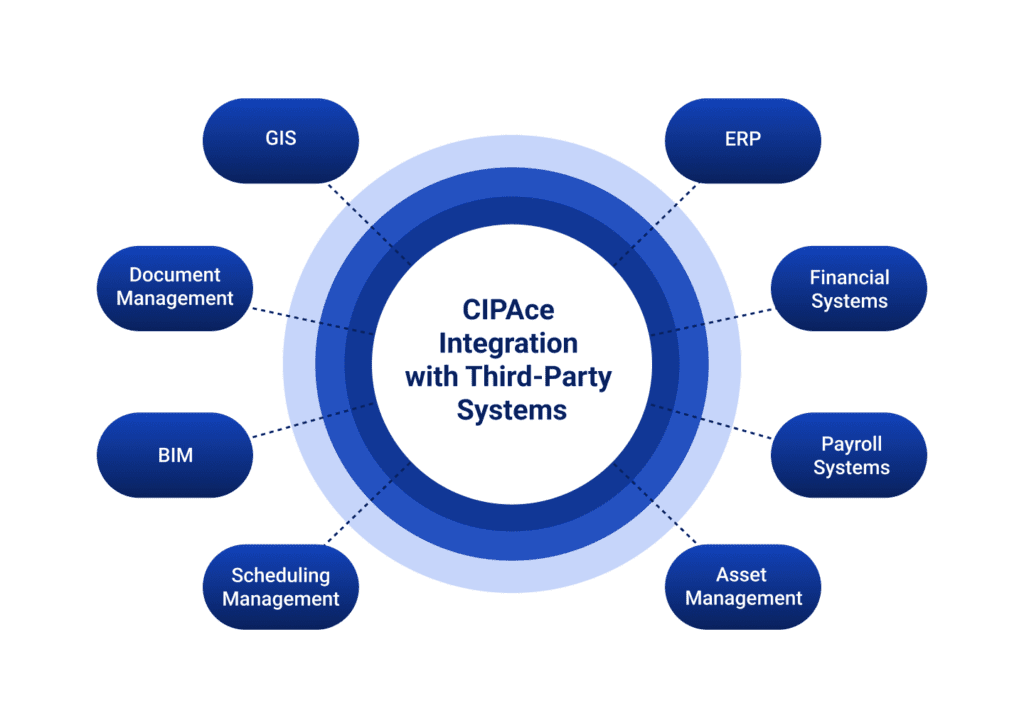
CIPAce™ is designed to connect with third-party systems and enterprise applications. The platform supports integration with external tools to enable data exchange, reporting, and extended functionality.
These integration capabilities allow organizations to leverage existing systems while maintaining CIPAce™ as a central system of record.
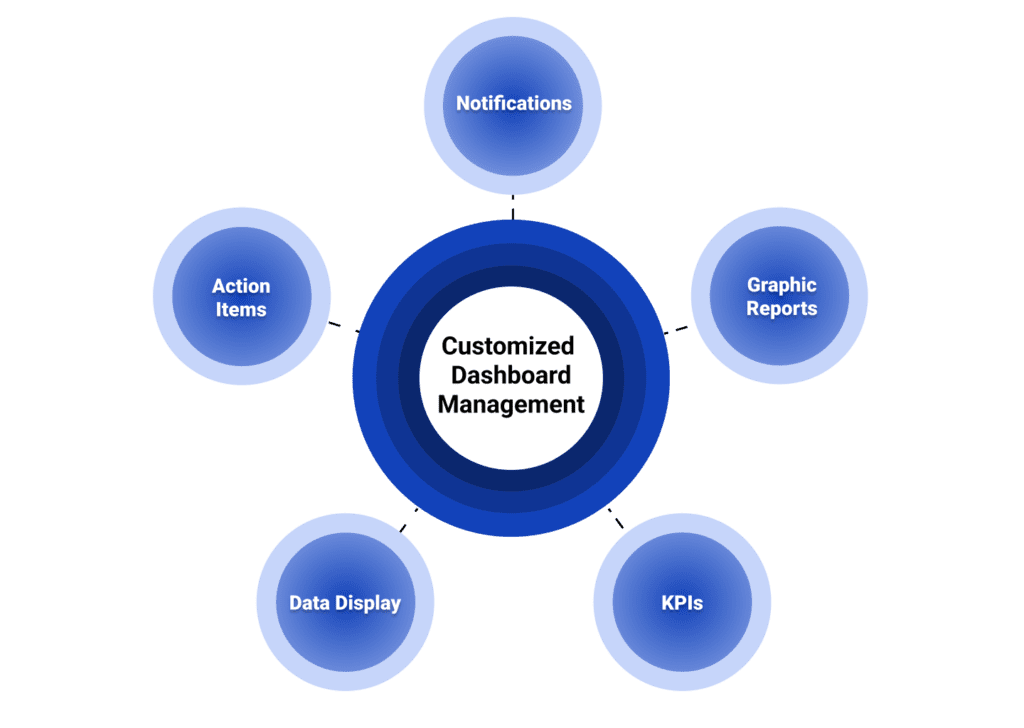
The CIPAce™ Portal and Dashboard Management functions enable users to configure their dashboard display within a single screen upon login according to their needs and preferences. This customization through a web-based designer with an intuitive graphic interface helps users stay informed of the status of all pending and/or upcoming tasks on a real-time basis, and thus enables users to perform daily tasks more efficiently and effectively.
Users in management roles can utilize customizations, such as project overviews, to monitor key or underperforming projects that may need extra attention or guidance. Individual users or user groups can configure their dashboards to consolidate the data, graphic reports, and frequently accessed functionalities based on their needs and/or preferences. The Dashboard Management function can also provide a “health check” on performance measures at a glance using color-coded graphics and buttons with drill-down capabilities.
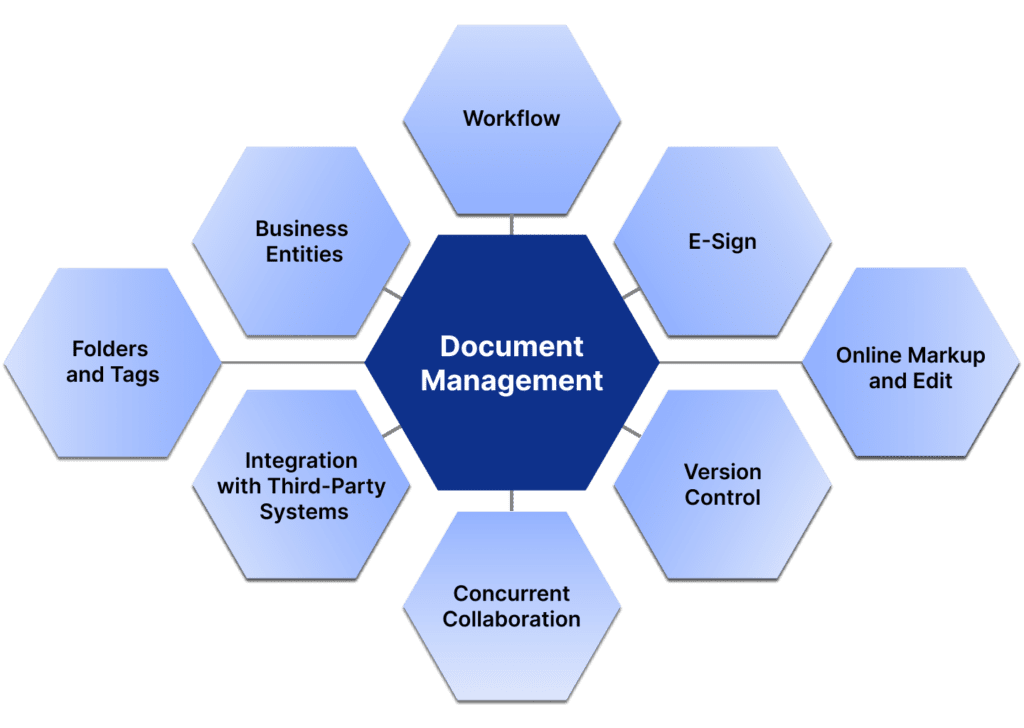
CIPAce™ provides a full-featured Document Management System that centralizes the electronic storage and control of all business records and activities contained within a client’s CIPAce™ application system. CIPAce™ can also integrate with third-party document management systems to link CIPAce™ entities to external documents stored in third-party software.
The Document Management System enables the following:
The Workflow and Notification Engine (WNE) is a robust and versatile tool that can be applied to most, if not all, business processes within an organization. It enables the effective deployment of customized workflows that significantly improve productivity by automating multi-party and interdepartmental work activities that can be standardized and streamlined.
WNE capabilities include the following:
Through predefined and built-in validation criteria within the application system, the Workflow Engine performs required validations on user entries before enabling the start and/or continuation of a workflow. A Workflow Log records all activities and data transformations at each step of a given workflow.
The Workflow and Notification Engine can be used to standardize and manage a wide range of routine business processes, including proposals; project scoping, ranking, and funding; RFPs and solicitations; cost estimates; budgets; contracts; purchase orders; invoices; design and construction submittals; RFIs and change orders; as well as interdepartmental reviews and approvals. In addition, workflow summaries and transaction-level data can be used to support audits and identify opportunities for process improvement.

CIPAce™ application system user interfaces are rendered using Dynamic Form and Metadata Management foundations. Interface elements and their descriptions are stored in the database and displayed accordingly. Because user interface descriptions are not hard-coded into the system, they can be modified at any time, enabling flexible and efficient customization across application pages.
Some examples include the following:
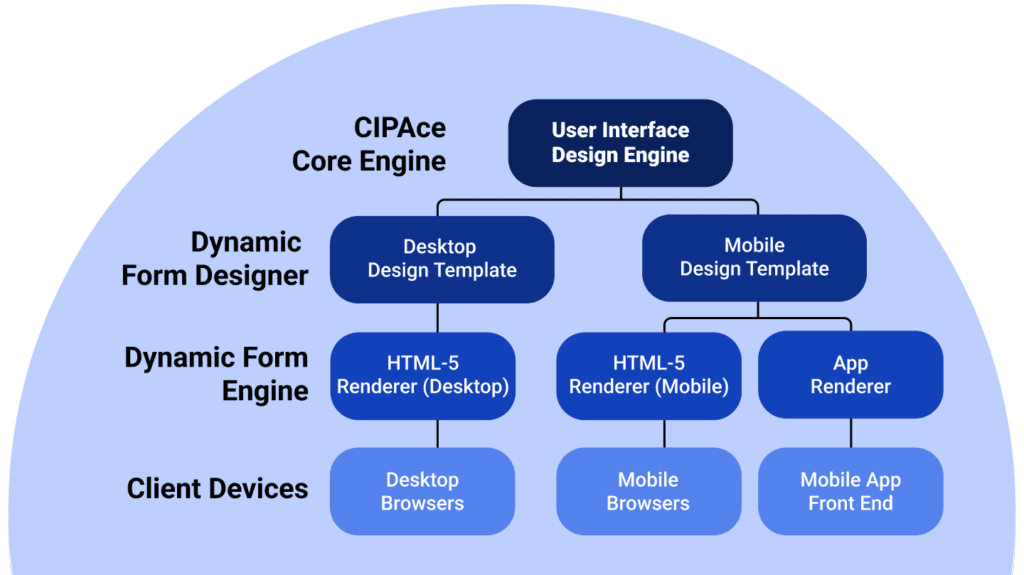
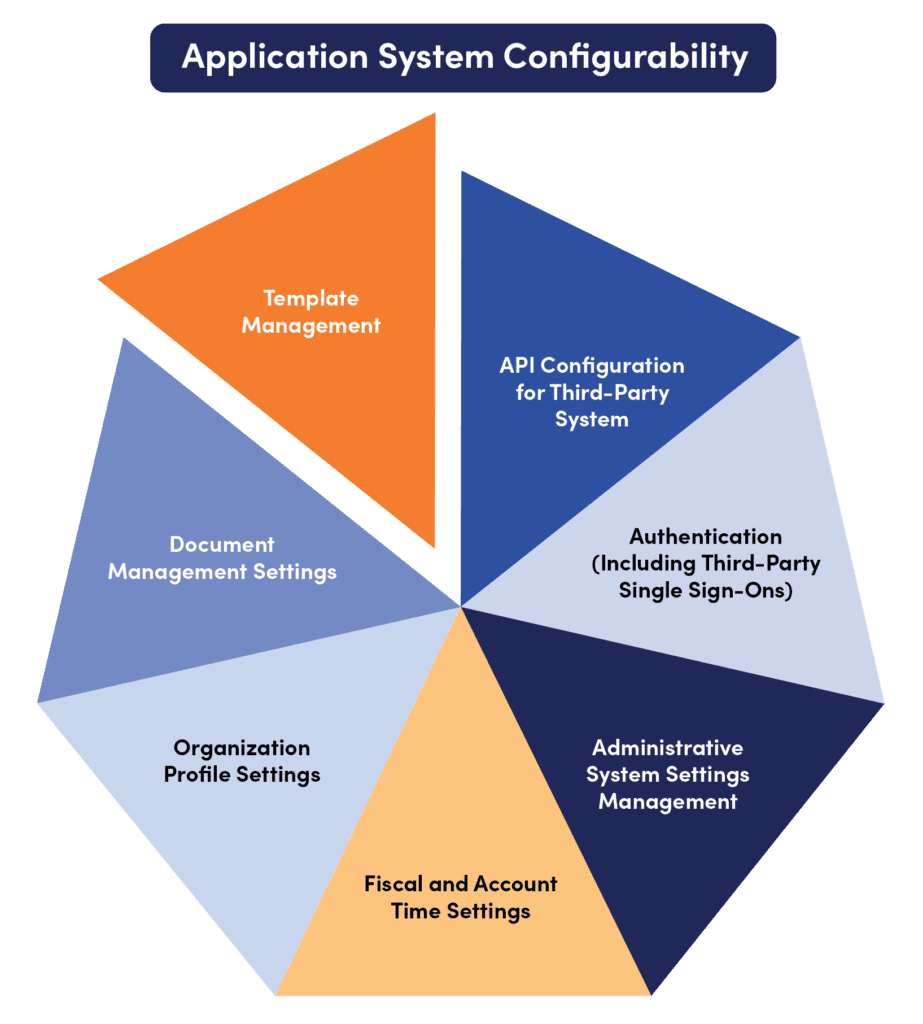
As the essential component of CIPAce™ Technology, the CIPAce™ Core Engine functions as a bundle of system building blocks that can be assembled to meet customers’ specific requirements. This modular approach provides extensive flexibility in developing application systems tailored to each client’s unique business needs. The Core Engine enables powerful configurability, scalability, and adaptability, along with system security and integration capabilities required to support today’s fast-paced and evolving business environments.
Core Engine capabilities for comprehensive configurability include the following:
The CIPAce™ Report Engine provides a comprehensive set of standard and customizable reporting capabilities that allow users to access virtually every data element contained within a CIPAce™ application system. The Report Engine plays a critical role in supporting decision-making, performance measurement, accountability, and transparency across capital programs and projects.
The Report Engine supports three types of reports: Standard, Custom, and Analytic.
Standard Reports
CIPAce™ Standard Reports are available immediately upon application system installation. These reports can be configured and modified to meet user-specific needs and can be produced in multiple output formats, including Crystal Reports, PDF, Word, and Excel. Additional reports may be added to the report library to support evolving business and reporting requirements.
Custom Reports
The CIPAce™ Custom Reports module is a web-based report design tool that enables users to develop fully customizable reports. Users can query and extract data from the underlying database using a web-based query interface or SQL stored procedures. Custom reports can be saved and published within the application system and viewed online or scheduled for automated delivery. Data sources can also be formatted using external report-generation tools such as Crystal Reports or Excel.
Analytic Reports
The CIPAce™ Analytic Reports module enables users to analyze large volumes of data to gain real-time insights into the strategic and operational performance of capital programs and projects. This module uses an intuitive web-based interface to generate graphical summaries, dashboards, and scorecards with drill-down capabilities for deeper analysis.
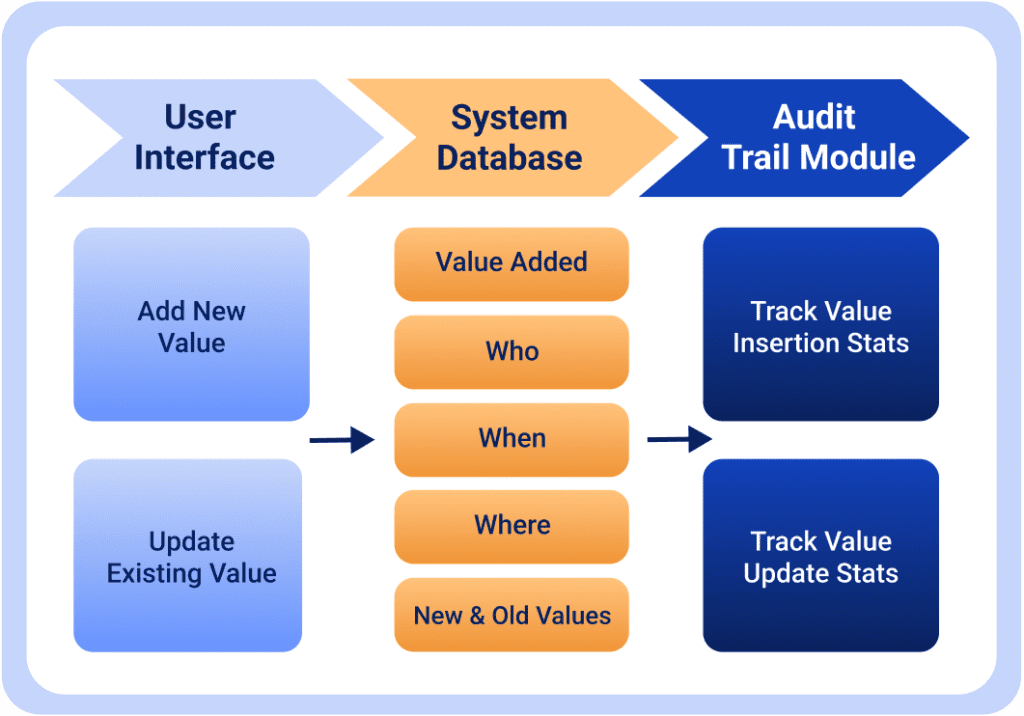
The CIPAce™ Audit Trail Engine maintains a complete timeline of changes made to business records and administrative activities within the system at both transaction and management levels. It captures detailed information for each transaction, including changes to data values, timestamps, and the users responsible for those changes. The Audit Trail Engine also tracks project-level changes such as team composition, project details, and scope modifications.
On the administrative side, the Audit Trail Engine monitors user activity and records changes made to users, vendors, access permissions, and other administrative configurations. Together, these capabilities provide a comprehensive and reliable log of system activity that supports effective project management and operational oversight.
CIPPlanner has made significant investments in the CIPAce™ Audit Trail Engine as a core component of its cloud-based architecture. Its capabilities support compliance, litigation readiness, troubleshooting, transaction integrity, intrusion detection, activity forensics, and analysis of system usage and operations.
Robust Audit Trail capabilities include the following:
Using the CIPAce™ Access Control module, administrators can configure complex user access scenarios to align with an organization’s specific needs and preferences. The rule-based access control design provides extensive flexibility in defining how users interact with system data and functionality under a wide range of conditions.
Some examples include the following:
The CIPAce™ Integrated Framework enables user-defined integrations with third-party software applications through the CIPAce™ Web Application Programming Interface (API). The framework supports secure, two-way data exchanges with a wide range of external systems, helping organizations reduce the complexity typically associated with integrating data across multiple platforms.
CIPPlanner actively collaborates with leading technology and industry partners, including Microsoft, Oracle, Tyler Technologies, ESRI, and Laserfiche, to support native data integration with financial systems, databases, project management platforms, and geographic information systems. The Integrated Framework also supports integration with third-party project design and construction management tools, enabling seamless data flow across the capital project lifecycle.
Includes inspection, field change, management processes, site walk, drawing review, and project close out processes
Data availability and consistency provides solid management foundation when needing to access or change information on-the-go.
Capable of accessing data that is pulled from third-party systems once system integration has been set up.
Powerful reporting capabilities support instant evaluation of contractor performance, enabling staff to act on potential issues before it is too late.
Software can be easily tailored to your organization's desired workflow processes, data tracking needs and naming conventions, without programming.
Data just needs to be entered once and can then be reused in a subsequent process and accessed from different device types like mobile or tablet.
CIPPlanner is a leading provider of cloud-based enterprise solutions for capital infrastructure program management. Since 2000, our CIPAce™ platform has helped government agencies and private organizations streamline project delivery, optimize investments, and enhance efficiency. Trusted by local and state governments, Fortune 500 companies, and global enterprises, we deliver innovative, scalable solutions for the entire project lifecycle.

We use cookies to improve your experience on our site. By using our site, you consent to cookies.
Websites store cookies to enhance functionality and personalise your experience. You can manage your preferences, but blocking some cookies may impact site performance and services.
Essential cookies enable basic functions and are necessary for the proper function of the website.
These cookies are needed for adding comments on this website.
Statistics cookies collect information anonymously. This information helps us understand how visitors use our website.
Google Analytics is a powerful tool that tracks and analyzes website traffic for informed marketing decisions.
Service URL: policies.google.com (opens in a new window)
You can find more information in our Cookie Policy and Privacy Policy.


