


The CIPAce™ 10.5 release introduces key enhancements focused on mobile productivity and secure document management, enabling users to work seamlessly in any environment while improving system configuration and security.
Offline Mobile Capabilities for Continuous Productivity
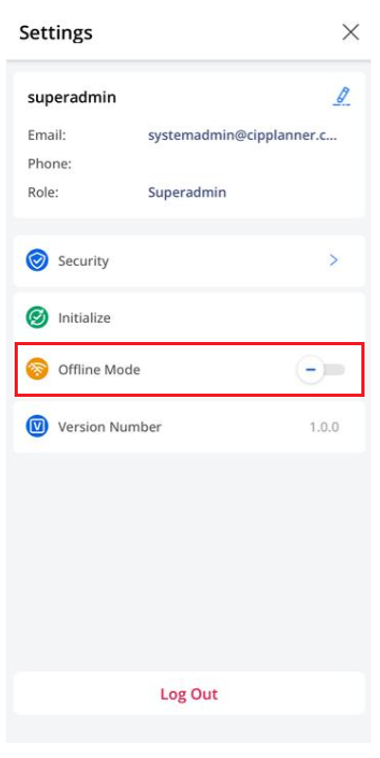
CIPAce™ now delivers full offline functionality within its mobile application, allowing users to continue working without network connectivity. This enhancement ensures uninterrupted access to critical data and workflows, whether in the field or in low-connectivity environments.
Users can seamlessly switch between online and offline modes, with the system intelligently prompting transitions when connectivity is lost. Data can be cached in advance—either individually or in bulk, ensuring that important records remain accessible and editable at all times.
Offline functionality closely mirrors the online experience, enabling users to browse, edit, and create records, manage documents, and capture photos with markup. Once connectivity is restored, all updates automatically synchronize, maintaining data consistency and eliminating manual re-entry.
Additional capabilities such as offline data management, status tracking, and batch upload further enhance usability, while built-in safeguards help prevent data conflicts during synchronization.
Enhanced Adobe Sign Integration and Configuration
This release also improves Adobe Sign integration, making it more accessible, secure, and easier to manage for administrators.
Configuration is now centralized within Application Settings, allowing users to manage Adobe Sign setup alongside other system configurations. Previously complex steps, such as entering API credentials, can now be completed directly through the user interface, eliminating the need for database access.
Security has also been strengthened with encryption of sensitive credentials, including client secrets, reducing the risk of exposure. In addition, new permission controls provide more granular access management, ensuring that only authorized users can configure or modify Adobe Sign settings.
Together, these enhancements streamline document workflows while improving governance and security across the platform.
With the 10.5 release, CIPAce™ continues to enhance flexibility and usability by enabling offline mobile work and simplifying secure integrations. These updates empower organizations to maintain productivity in any environment while ensuring that critical data and document workflows remain secure and efficient.

